






Random AI Prompt

Contributors Stars Forks Watchers Last commit Commits Version Node CI Engine coverage Code quality Quality gate Tech debt OpenSSF Scorecard Docs Netlify Open issues Closed issues Open PRs Closed PRs License

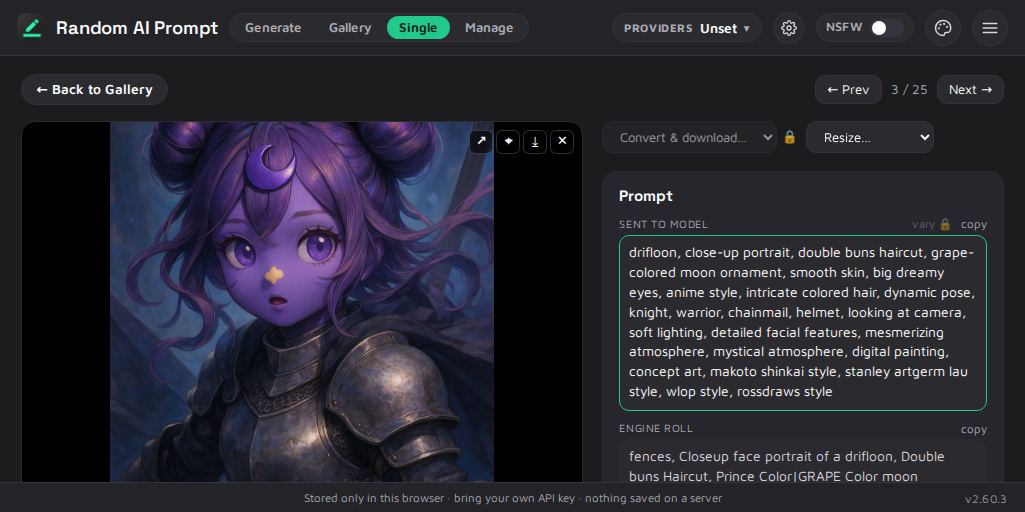
Random AI Prompt shown with a generated image, its prompt, and the DPL source

Random AI Prompt is an open-source generator for AI image and text prompts. Instead of making you write long, detailed prompts by hand, it lets you compose from a library of ready-made scenes, subjects, and styles and fills in the depth automatically — turning a one-line idea into a fully fleshed-out prompt. You can then run the result through 40+ models, including Midjourney, DALL·E, Gemini, FLUX, and Stable Diffusion, right in your browser with your own API key — or just generate the prompt text with no key at all. It runs entirely on your device and stores nothing on a server.

📖 Documentationfairyfox.io/random-ai-prompt

Get it

Try it live Online edition — prompt.fairyfox.io (no install, bring your own key)
Download Desktop app + self-hostable online build — GitHub Releases
Source Repository · Notes

What is this

Random AI Prompt is a tool for anyone who wants good AI-generated images or text without the chore of writing a detailed prompt first. Most people type a short idea and get a flat result, because the models reward long, richly detailed prompts that are tedious to write by hand. This project turns that around: you assemble a prompt from building blocks — drop in a generated beach scene, roll a random subject, add an art style, or reach for a wildcard from the whole catalog — and it expands your short idea into a detailed, never-the-same prompt. When you are happy with the text, you can send it to one of the built-in providers or simply copy it and use it elsewhere.

Under the hood, prompts are written in a small composition language (DPL) with tokens for scenes, subjects, styles, randomness, intensity, and focus, so a one-line idea can unfold differently each time. Everything runs in the browser and keeps your data on your device: settings and your own API keys live only in local storage, and requests go straight from your browser to the provider you chose, with no server in between. The project ships as two editions from one codebase: a browser-only online edition, hosted at prompt.fairyfox.io, and a full desktop edition — available as a pre-built download (or build it from source) — that adds the image gallery, single-image view, an in-app content manager, local Stable Diffusion providers, and an 18+ NSFW mode. Neither edition is "the" version: the hosted site is just one deployment of the online edition, and you can self-host that same online build or run the desktop app locally — all from one codebase.

Some of the features

  • Prompts as a language. Write {#beach} to drop in a generated beach scene, {keyword} to pull a random word from a list, {#scene} to roll a random scene, or {#any} for a wildcard from the whole catalog. Tokens nest, compose, and re-expand.
  • Intensity and focus dials. Tune any token with two independent percentages: {#beach i25%} is a light touch, {#beach i90%} goes all-in, and {#beach f80%} keeps only the essentials. The dials cascade into every nested block.
  • Provider-agnostic, bring-your-own-key. Around 40 image and text backends behind one interface, including OpenAI, Anthropic, Gemini, Midjourney, Ideogram, Leonardo, FLUX/BFL, Replicate, fal, and Stability. Keys stay on your device and calls go straight to the provider.
  • A curated content library. Dozens of scene, subject, fragment, and style blocks plus dozens of word lists, with de-duplication that reduces accidental repetition of the same element.
  • Live content editing (desktop). The in-app content manager edits the real block and list files on disk and applies changes without a restart.
  • Reproducible by design. The engine is deterministic and seedable, so the same seed reproduces the same prompt, which helps with sharing and iterating.
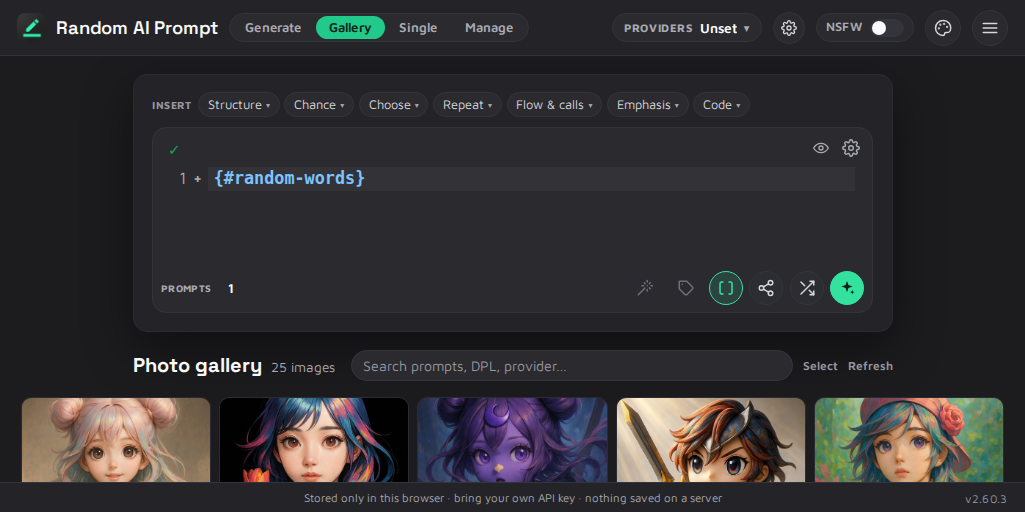
The Gallery screen, browsing generated images

How to get it

There are a few ways to run Random AI Prompt, and none of them require you to build anything unless you want to.

Online edition — nothing to install. The hosted online edition at prompt.fairyfox.io is always the latest build: open it, optionally paste your own API key (or skip the key and generate prompt text only), and start composing. Nothing is stored on a server. Want to run the online edition yourself? Every release attaches a ready-to-host online bundle (random-ai-prompt-<version>-online.zip) on the Releases page — static files you can drop on any web host (Netlify, Cloudflare Pages, GitHub Pages, nginx, or npx serve). The hosted site is just one deployment of that same bundle.

Desktop edition — download pre-built. The full desktop edition (image gallery, single-image view, in-app content manager, local Stable Diffusion providers, and 18+ mode) is a pre-built download for Windows, macOS, and Linux on the Releases page:

  • Windows — an installer (.msi / .exe), or a portable .zip (unzip and run, no install).
  • macOS — a .dmg you drag to Applications, or the .app run in place.
  • Linux — a portable .AppImage, or a .deb.

The desktop app is self-contained — it bundles its own Node runtime and needs nothing installed beforehand (on Windows it uses the built-in WebView2). A portable build keeps its data beside itself; an installed build uses your per-user app-data folder, so upgrades never touch your settings or generated images.

Desktop edition — run from source. Prefer to run from a checkout, for development or just by preference? Build it from source, then start the local server, which builds the app and serves it together with the /api backend:

npm start

It prints a local URL (for example http://localhost:4173); open it in your browser and press Ctrl+C to stop. To serve an already-built app without rebuilding, use npm run serve; for day-to-day development with hot reload, use npm run web.

Generating images requires access to a provider — either a bring-your-own-key cloud provider or a local Stable Diffusion WebUI running with --api. Generating prompt text requires no key.
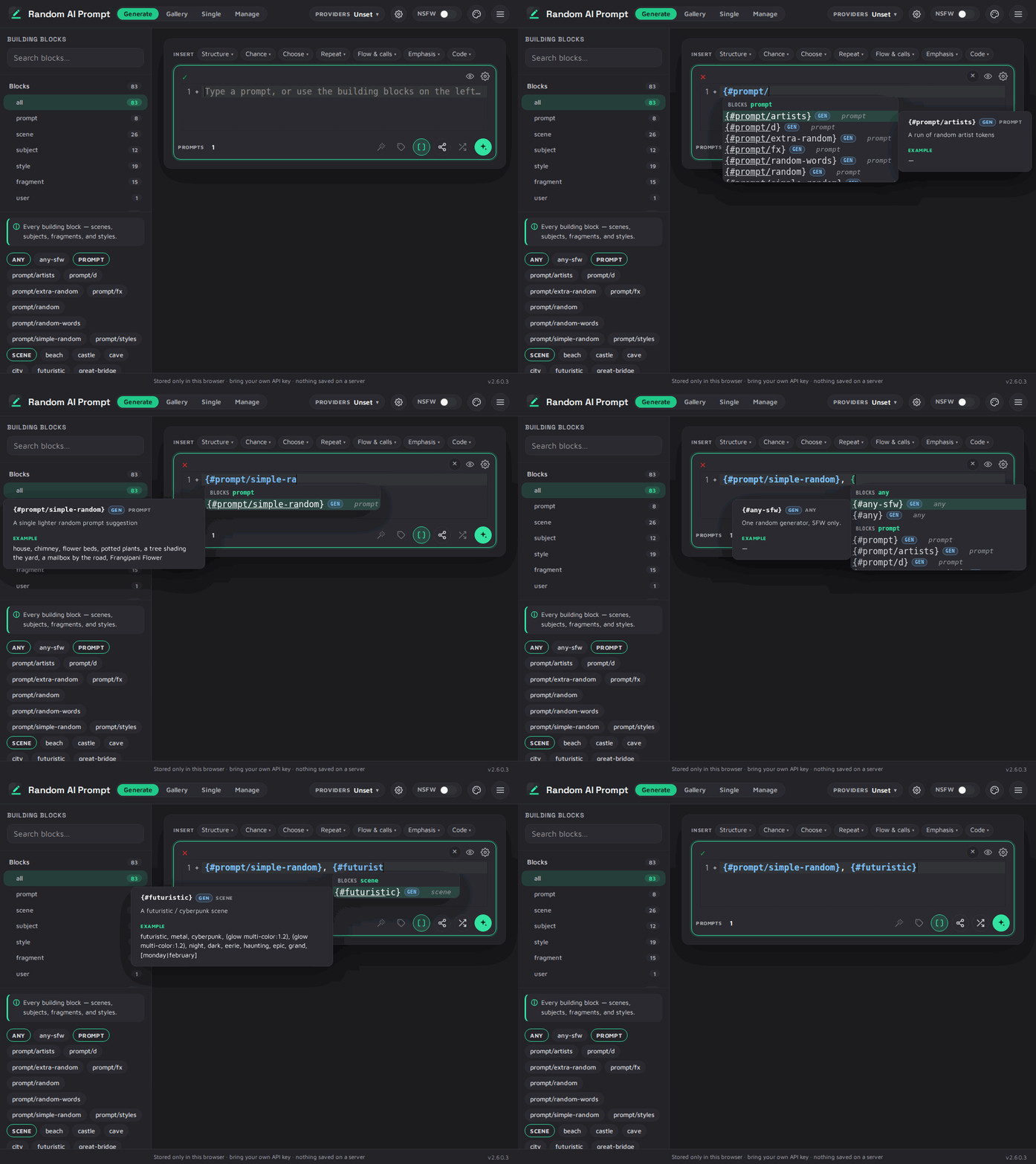
Composing a prompt from building blocks — typing block references into the prompt box

How to build

Building from source produces the full desktop edition (gallery, single-image view, content manager, local providers, NSFW mode). It requires Node.js 24 or newer (the version is pinned in .nvmrc), and every command is run from the repository root.

git clone https://github.com/1fairyfox/random-ai-prompt.git
cd random-ai-prompt
npm install

npm install installs both the engine and the targets/web/ application. From there you can run it live with npm run web or npm start (see How to run), or produce a static production build:

npm run web:build

This outputs the built site to targets/web/dist/. The same source builds two editions: the full local/desktop build, and the browser-only online build, in which the local-only features are gated off through the VITE_ONLINE flag.

To run the checks and tests:

npm test
npm run test:e2e

npm test is the headless gate: a documentation-link check, linting, a smoke test, and the unit and component suites. npm run test:e2e runs the end-to-end and visual-regression suites, and requires npx playwright install chromium once beforehand.

Contributing

Contributions are welcome, from a typo fix or a new building block to a bug report or a feature. See CONTRIBUTING.md for the full guide, including how to set up a local environment, the branch workflow, the checks to run, and how to submit a pull request.

In short: fork the repository, branch your work off dev, run npm test until it passes, and open a pull request against dev rather than main. The developer guide lives in the notes directory; begin with notes/status.md.
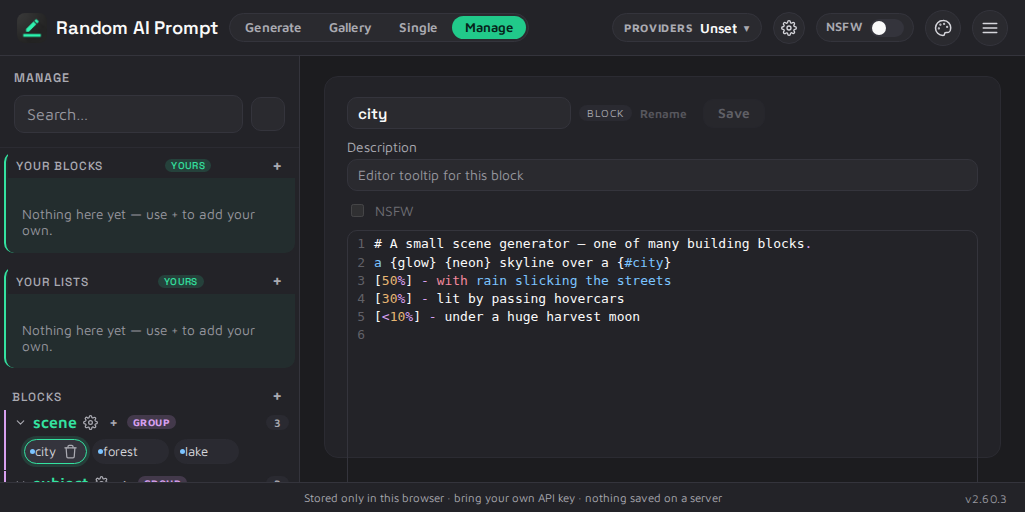
The content manager, editing a scene block written in DPL

Credits

Random AI Prompt is created by 1fairyfox, with early internal list work by Merk. It builds on the work of others:

  • Prompt and word lists — the artist and Danbooru tag lists from stable-diffusion-webui and a1111-sd-webui-tagcomplete, the SCOWL dictionary, WordNet (Princeton University), and NovelAI Experiments by u/Carlyone (CC BY 4.0). All lists were cleaned up and passed through a content-safety filter.
  • Frameworks and tooling — React, Vite, and Node 24; internationalization with react-intl / FormatJS; testing and screenshots with Playwright. Hosting is on Netlify (online edition) and GitHub Pages (docs).
  • AI assistance — parts of the modernization, the internationalization pass, and the release-screenshot toolkit were built with Claude (Anthropic).

Full attributions and license texts are in list-credits.md.

Links


Part of the Fairy Fox project mesh — all projects · this project · shared standards & docs.

License

Licensed under Apache-2.0.

engine/blockCatalog.js

Description:
  • The categorized building-block catalog — the "token cloud" behind the palette and the DPL editor's autocomplete.

    This is engine domain: it describes the engine's own content pools (generators + lists), their folder categories, the virtual {#any} / {keyword} wildcards, the NSFW gate, and the naming rules. Nothing about it is a UI concern — the UI merely renders what this returns.

    It is a pure function of a loader, which is why it can live here at all: every target passes its own (nodeLoader / runtimeLoader in the browser / metroLoader on the phone) and gets the same catalog. It used to exist twice — targets/web/frontend/lib/promptEngine.js owned it and the mobile target carried a 218-line hand-port (lib/blockCatalog.js) with no drift check at all, which is worse than a guarded copy, not better. See notes/plans/de-duplication.md.

    Recomputed from the current loader state on every call, so a hot-apply refresh (or browsing after a Manage edit) shows the live catalog.

    Shapes: group = { title, hint, items } items = a flat run of [category pill, its chips, category pill, its chips, …] pill = { category: true, label, token?, description?, forceList? } chip = { token, label, description? }

Source:

The categorized building-block catalog — the "token cloud" behind the palette and the DPL editor's autocomplete.

This is engine domain: it describes the engine's own content pools (generators + lists), their folder categories, the virtual {#any} / {keyword} wildcards, the NSFW gate, and the naming rules. Nothing about it is a UI concern — the UI merely renders what this returns.

It is a pure function of a loader, which is why it can live here at all: every target passes its own (nodeLoader / runtimeLoader in the browser / metroLoader on the phone) and gets the same catalog. It used to exist twice — targets/web/frontend/lib/promptEngine.js owned it and the mobile target carried a 218-line hand-port (lib/blockCatalog.js) with no drift check at all, which is worse than a guarded copy, not better. See notes/plans/de-duplication.md.

Recomputed from the current loader state on every call, so a hot-apply refresh (or browsing after a Manage edit) shows the live catalog.

Shapes: group = { title, hint, items } items = a flat run of [category pill, its chips, category pill, its chips, …] pill = { category: true, label, token?, description?, forceList? } chip = { token, label, description? }

engine/blockManifest.js

engine/contentSafety.js

engine/core/browserCatalogData.js

engine/core/browserLoader.js

engine/core/browserUserCatalog.js

engine/core/dpl/dpl.js

engine/core/dpl/intensity.js

engine/core/dpl/parser.js

engine/core/dpl/renderer.js

engine/core/dpl/rng.js

engine/core/dpl/words.js

engine/core/engine.js

engine/core/listStore.js

engine/core/metroLoader.js

engine/core/nodeLoader.js

engine/core/rng.js

engine/core/stages/block.js

engine/core/stages/cleanup.js

engine/core/stages/emphasis.js

engine/core/stages/list.js

engine/core/stages/prompt-salt.js

engine/data/blocks/prompt/artists.js

engine/data/blocks/prompt/d.js

engine/data/blocks/prompt/extra-random.js

engine/data/blocks/prompt/random-words.js

engine/data/blocks/prompt/random.js

engine/data/blocks/prompt/simple-random.js

engine/data/blocks/prompt/styles.js

engine/data/blocks/style/silhouette.js

engine/data/blocks/style/vibrant-art.js

engine/data/blocks/subject/animal.js

engine/data/blocks/subject/entity-name.js

engine/data/blocks/subject/entity.js

engine/data/blocks/subject/living-entity.js

engine/data/blocks/subject/person.js

engine/data/process-artists-csv.js

engine/data/process-danbooru-csv.js

engine/data/process-nai-tag-expirement.js

engine/dplInsertCatalog.js

Description:
  • The DPL insert catalog — the engine's own grammar, described once, for every target.

    This is the list of non-text DPL constructs (structure, chance, choose, repeat, flow, emphasis, code) that the prompt box's Insert menu offers: for each one, the literal syntax, an editor template and — where output is meaningful — a live example. Every entry mirrors a rule the DPL compiler in engine/core/dpl/dpl.js actually implements. It is a description of the engine's language, so it belongs to the engine — not to the web app that happened to build the first menu.

    It used to live twice: targets/web/frontend/lib/dpl/dplInserts.js and a 262-line hand-port in targets/mobile/lib/dplInserts.js, kept honest by a drift check (checkDplInserts). That check is deleted with this file's arrival — a copy that can't exist can't drift. (See notes/plans/de-duplication.md; this was the last hand-port in the campaign.)

    What lives here and what does NOT

    Here: everything language-neutral — the ids, the DPL text, the structure. Change the grammar, change it once.

    Not here: the human labels. The web localizes them through react-intl (dplInsertsMessages.js) and the mobile app ships English strings; a target's label layer is a presentation concern with different machinery on each platform. Forcing one on the other would import the web's i18n dependency into React Native for no gain. So each target attaches its own labels via buildInsertMenu — the shared thing is shared, the platform-specific thing stays put.

    Template conventions (the same in every target)

    • ${1:foo} — a numbered tab stop with a default (CodeMirror selects it so you can type over it).
    • ${sel} — the current selection, for wrap items (emphasis et al.).
    • line: true — a line-leading construct; the editor pushes it onto a fresh line.
    • wrap: true — wraps the current selection.
    • example — concrete DPL the menu re-rolls live.
Source:

The DPL insert catalog — the engine's own grammar, described once, for every target.

This is the list of non-text DPL constructs (structure, chance, choose, repeat, flow, emphasis, code) that the prompt box's Insert menu offers: for each one, the literal syntax, an editor template and — where output is meaningful — a live example. Every entry mirrors a rule the DPL compiler in engine/core/dpl/dpl.js actually implements. It is a description of the engine's language, so it belongs to the engine — not to the web app that happened to build the first menu.

It used to live twice: targets/web/frontend/lib/dpl/dplInserts.js and a 262-line hand-port in targets/mobile/lib/dplInserts.js, kept honest by a drift check (checkDplInserts). That check is deleted with this file's arrival — a copy that can't exist can't drift. (See notes/plans/de-duplication.md; this was the last hand-port in the campaign.)

What lives here and what does NOT

Here: everything language-neutral — the ids, the DPL text, the structure. Change the grammar, change it once.

Not here: the human labels. The web localizes them through react-intl (dplInsertsMessages.js) and the mobile app ships English strings; a target's label layer is a presentation concern with different machinery on each platform. Forcing one on the other would import the web's i18n dependency into React Native for no gain. So each target attaches its own labels via buildInsertMenu — the shared thing is shared, the platform-specific thing stays put.

Template conventions (the same in every target)

  • ${1:foo} — a numbered tab stop with a default (CodeMirror selects it so you can type over it).
  • ${sel} — the current selection, for wrap items (emphasis et al.).
  • line: true — a line-leading construct; the editor pushes it onto a fresh line.
  • wrap: true — wraps the current selection.
  • example — concrete DPL the menu re-rolls live.

engine/gatedLists.js

engine/helpers/aliases.js

engine/helpers/keywordRepeater.js

engine/helpers/random.js

engine/helpers/randomAlternating.js

engine/helpers/randomEditing.js

engine/helpers/randomEmphasis.js

engine/listEditorOps.js

Description:
  • Pure list-editor operations: parsing an AI "expand" reply into clean candidate entries, merging in only the new ones, de-duplication, and alphabetical sorting.

    These operate on list content, which is engine domain — a list is one of the engine's two content pools, and "what counts as a duplicate entry" is a property of the engine's lists, not of any one UI. So this lives in engine/ and every target imports it: the web's Manage list editor (components/ManageListEditor.jsx) and the mobile one (screens/ManageScreen.js). It used to live inside the web target with a byte-for-byte hand-ported copy in mobile, kept honest by a drift check (checkListOps) that is now deleted — you cannot drift from yourself.

    Side-effect-free (no React, no RN, no I/O), so it's unit-tested directly and is safe under all three loaders (Node / browser / Metro). See notes/plans/de-duplication.md.

Source:

Pure list-editor operations: parsing an AI "expand" reply into clean candidate entries, merging in only the new ones, de-duplication, and alphabetical sorting.

These operate on list content, which is engine domain — a list is one of the engine's two content pools, and "what counts as a duplicate entry" is a property of the engine's lists, not of any one UI. So this lives in engine/ and every target imports it: the web's Manage list editor (components/ManageListEditor.jsx) and the mobile one (screens/ManageScreen.js). It used to live inside the web target with a byte-for-byte hand-ported copy in mobile, kept honest by a drift check (checkListOps) that is now deleted — you cannot drift from yourself.

Side-effect-free (no React, no RN, no I/O), so it's unit-tested directly and is safe under all three loaders (Node / browser / Metro). See notes/plans/de-duplication.md.

engine/listManifest.js

engine/listResolve.js

engine/listTags.js

engine/nameOrder.js

engine/nodeEngine.js

engine/presets.js

engine/promptFilesAndSuggestions.js

engine/promptRun.js

engine/safetyLexicons.js

engine/settings.js

tmp/webapp-docs/frontend/components/single/messages.js

Description:
  • Shared react-intl messages (and the derive-source layer label map) for the single-image view and its sub-components. One source of truth so the view and the extracted cards stay in sync; ids are explicit, so this is a pure relocation of the strings that lived in SingleView.jsx.

Source:

Shared react-intl messages (and the derive-source layer label map) for the single-image view and its sub-components. One source of truth so the view and the extracted cards stay in sync; ids are explicit, so this is a pure relocation of the strings that lived in SingleView.jsx.